
How to Turn Website Visitors Into Customers
This scenario happens on thousands of business websites each day. Traffic is high. The analytics dashboard looks good. People click through from Google and media.. The phone stays silent. The inbox stays empty of orders.
High traffic with conversions is a very frustrating problem for business owners. You have worked hard to bring people to your website.. They leave without buying or calling or filling out a form. That is not a traffic problem. That is a conversion problem.
This guide explains how to turn website visitors into customers. It does not use gimmicks or guesswork. It uses proven, changes. It changes how your website communicates, guides and builds trust, with the people who land on it.
You will learn why visitors leave without converting. You will learn what actually drives conversions. You will learn how to build a website that turns traffic into leads and leads into paying customers.
What Does It Mean to Convert Website Visitors Into Customers?
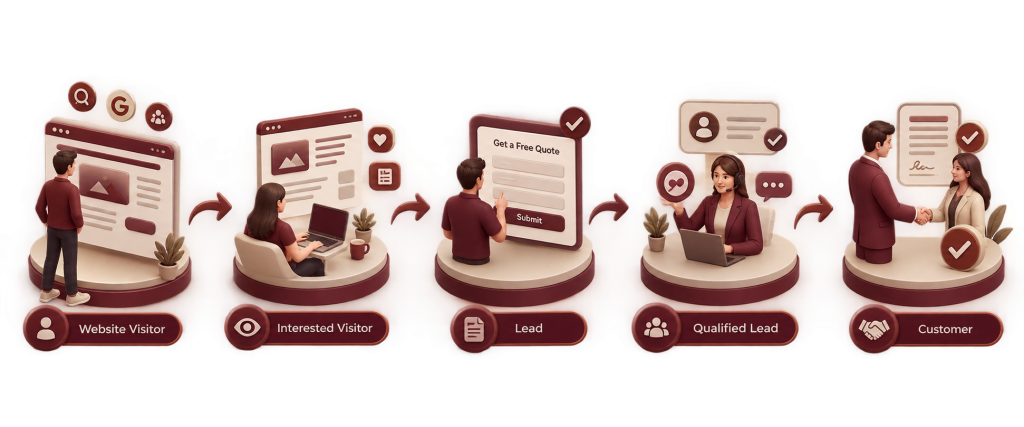
Converting a website visitor means guiding the visitor to take an action that brings the visitor closer to becoming a paying customer. Actions include filling out a form requesting a quote booking a call signing up for a trial or making a purchase.
Conversion does not happen in a step. It is a journey:
Visitor → Interested Visitor → Lead → Qualified Lead → Customer
Here is what that looks like in practice:
- A visitor lands on your website, after clicking a Google ad.
- Visitor browses your services page. Reads a case study. Now visitor is an interested visitor.
- Visitor fills out a “Get a Free Quote” form. Visitor is a lead.
- Sales team talks to visitor and confirms visitor has budget and a real need. Now visitor is a lead.
- Visitor signs the contract. Now visitor is a customer.
Every stage requires something from your website. Visitor needs clarity. Interested visitor needs proof. Lead needs a follow‑up process. Understanding this journey is the foundation of website conversion rate optimization.
Why Website Visitors Don't Become Customers
Before fixing conversions it’s important to know what is stopping them. These are the common problems.
Unclear Value Proposition
If a visitor doesn’t know what you do who you help and why you are different within a seconds of arriving on your site they will leave. Confusion is one of the ways to lose a potential customer.
Weak or Missing Call-to-Action
Many websites hide their CTA use words like “Learn More ” or completely forget to tell visitors what to do next. Visitors won’t guess. They need to be shown.
Poor Website User Experience
Messy designs, confusing menus and unclean layouts all cause problems. Every extra bit of effort a visitor has to make is a reason for them to stop.
Slow Website Speed
Visitors don’t like waiting. A slow page loads makes a first impression before they even see your content.
Lack of Trust
Without reviews, comments or signs of trust visitors have no reason to believe you will do what you promise. Especially if they don’t know your brand.
Forms
Long forms with too many fields make it hard for people to complete them especially on phones.
Poor Mobile Experience
Since many people use phones a website that doesn’t work well on mobile will lose visitors right away.
Wrong Target Audience
If the people coming to your site don’t really need what you offer no amount of changes will fix conversions. The quality of traffic is just as important, as the number of visitors.
Lack of Relevant Content
Visitors often need information before they are ready to take action. Without content that answers their questions they will go somewhere else.
Many Choices
When a page has too many options, links or CTAs visitors get tired and often do nothing at all.
12+ Proven Ways to Turn Website Visitors Into Customers
1. Make Your Value Clear
Your message should quickly answer four questions:
- What do you provide?
- Who do you assist?
- What issue do you fix?
- Why should someone pick you of others?
Example: Instead of “Welcome to Our Agency ” a better headline would be: “We Help Local Service Businesses Get More Calls and Bookings Through Google Ads.” It is specific shows benefits and is easy to understand away.
2. Use Clear and Strong Calls-to-Action
Your call-to-action should let visitors know what to do next. Good examples are:
- Get a Free Consultation
- Request a Quote
- Start Your Free Trial
- Book a Demo
- Get Started
- Shop Now
- Download the Guide
Put your call-to-action above the fold repeat it at good places as you go down the page and make sure the button looks different and catches attention. Stay away from words, like “Submit” or “Click Here”. They do not show what is important.
3. Build Trust With Social Proof
People choose to work with companies they believe in. Make sure to show trust by using:
- Customer reviews
- Testimonials
- Case studies
- Star ratings
- Client logos
- Certifications and awards
- Documented results
- User-generated content
Social proof is effective because it answers the question that every visitor is thinking: “Have people like me had an experience here?”
4. Optimize Landing Pages
A landing page that converts usually has:
- A clear headline that focuses on benefits
- A strong statement that highlights a specific benefit
- Visuals that support the message
- Social proof close to where the decision is made
- One clear call, to action
- A simple and short form
- Few distractions (no extra navigation or links)
The main goal of a landing page is to lead the visitor to take one action, not many.
5. Improve Website Speed
A fast website makes a first impression. Visitors notice speed before they even start reading your content. To boost performance focus on these areas:
- Optimize images by compressing file sizes without reducing quality.
- Use browser caching returning visitors load pages faster.
- Write efficient code to reduce unnecessary delays.
- Use content delivery networks (CDNs) to deliver content quickly from servers to users.
- Tune your site for speed since slow load times on mobile devices can turn users away.
A faster site removes roadblocks at the start of the customer journey.
6. Make Your Website Mobile-Friendly
Most people now use phones to browse the web. That means mobile usability directly impacts how many visitors become customers. Pay attention to:
- A design that works well on all screen sizes.
- Navigation that’s easy to use with thumbs—no scrolling or tiny links.
- Text that’s large enough to read without zooming in.
- Buttons that are big enough to tap without mistakes.
- Forms that are short and simple for mobile.
- Fast loading times, on slower mobile networks.
- When your site works on phones more people stay and more people convert.
7. Create Content That Answers Customer Questions
Helpful content builds trust. Moves visitors closer to a decision. Useful formats include:
- Blog posts answering common questions
- FAQ pages
- How‑to guides
- Comparison pages (for example “Option A vs. Option B”)
- Tutorials
- Case studies
- product and service pages
Content marketing and conversion optimization work together. Content educates and a well‑structured page turns that content into action.
8. Simplify Your Navigation
Visitors should find what they need in a few clicks. Make sure your navigation clearly leads to:
- Products or services
- Pricing
- Contact information
- FAQs
- resources such, as case studies or guides
If visitors have to hunt for basic information they will leave instead of searching further.
9. Use Live Chat or Conversational Tools
Live chat and chatbots let visitors get answers without leaving your website. They are great for questions like pricing, product availability or basic details. For complicated issues they can pass the conversation to a real person. Chatbots won’t automatically fix conversion rates. They are one tool in your strategy. Their success depends on how they are built and regularly updated.
10. Use Lead Capture Forms Strategically
Forms are often the step before a visitor turns into a lead so how they look and work matters a lot. Keep these points in mind:
- Form length- Shorter forms usually get more people to finish them
- fields- Only ask for what you really need
- Clear benefit- Tell the visitor what they get by filling out the form
- Strong CTA- Use clear, action-driven button text
Privacy reassurance. Add a short line, like “We’ll never share your information” to ease concerns
11. Offer Something Valuable
A lead magnet gives visitors a reason to share their contact information. The best options are those that truly help your audience. Good choices include:
- A consultation or audit
- An ebook or guide
- A checklist or template
- A free trial
- A limited-time discount
- An interactive calculator
- A webinar
The key is to make sure the offer actually solves a real problem for your specific audience. If its too general it won’t attract the people. Make sure your lead magnet is something people will actually use and find useful.
12. Create Personalized Experiences
Personalization can make a difference in how engaged your visitors become. But only when done carefully. You can improve engagement by tailoring content based on:
- What pages visitors have seen
- What actions they’ve taken on your site
- Their location if it matters to what you offer
- How they’ve interacted with you before
- Which customer group they belong to ( visitor or returning)
- Any interests or preferences they’ve shared
Be clear, about how you collect and use data. Always follow privacy rules. Keep things transparent. People should feel confident that their information is handled responsibly.
13. Retarget Interested Visitors
It is normal that not every visitor will become a customer away. Retargeting lets you reach out again to visitors who showed interest but did not act, using channels such as:
- Google Ads remarketing
- Social media advertising
- Email marketing (for visitors who already gave you their email)
Retargeting is most useful when it is relevant and helpful not repetitive or annoying. Showing an ad for the product a visitor looked at is much better than showing generic brand ads too often.
14. Create a Strong Follow‑up System
What you do right after a visitor becomes a customer is as important as the sale itself. A good follow‑up system has:
- A thank‑you page that tells the next steps
- An automatic confirmation email
- Timely sales follow‑up for leads that show high intent
- An email nurture sequence, for leads that are not yet ready to buy
- Relevant offers at the right time
- CRM tracking so no lead is lost
A strong follow‑up process can turn a cold lead into a paying customer.
The Website Conversion Funnel
Understanding the sales funnel helps you provide the information and actions based on where a visitor actually is while making a decision.
Awareness → Interest → Consideration → Conversion → Retention
Awareness:- The visitor learns about your company by searching online seeing social media posts or clicking on advertisements. Your homepage and content at the top of the funnel should clearly show what you do.
Interest:- The visitor wants to know more. Looking at your services reading articles or visiting your “About” section. This is when educational content and clear communication are most important.
Consideration:- The visitor is looking at options. Case studies, customer reviews and detailed information about your services can help here.
Conversion:- The visitor takes an action. Filling in a form buying a product or setting up a meeting. This is where call to action buttons forms and landing pages have the impact.
Retention:- After the sale sending follow-up emails providing service and staying in touch can turn a one-time customer into a regular customer or someone who recommends you.
Example: A visitor finds a plumbing business using Google (Awareness) reads a post about “what to do when your water heater stops working” (Interest) looks at reviews and compares prices with companies (Consideration) fills out a form to get a quote (Conversion) and later signs up, for a yearly service plan (Retention).
Website Elements That Help Increase Conversions
- Headline- Tells your message right away
- Value proposition- Shows why you are the best option
- CTA- Tells visitors exactly what to do next
- Testimonials and reviews- Build trust using real stories
- Benefits- Focus on results not only features
- Product/service information- Answers practical questions early
- Pricing- Clarity reduces doubt
- FAQs- Answer doubts before they stop people
- Trust badges- Show certifications, security seals, industry links
- Contact options- Phone, email, chat and forms all easy to find
- Forms- Simple and easy
- Live chat- Instant help, for unsure visitors
- Case studies- Proof that your solution really works
I see each element helps cut friction and gives visitors the confidence they need to act.
How to Improve Website Conversion Rate
Conversion rate is one of the important metrics when it comes to measuring how well a website is performing. It tells you how many visitors take a desired action. The formula to calculate conversion rate is:
Conversion Rate = (Number of Conversions ÷ Number of Visitors) × 100
For example if your website had 2,000 visitors in a month and 40 of them filled out a contact form your conversion rate would be:
(40 ÷ 2,000) × 100 = 2%
- Before you can start improving this number you need to decide what exactly counts as a conversion, for your business. A conversion can be any action that matters to your goals. Common conversion goals include:
- A purchase
- A form submission
- A phone call
- A demo booking
- A consultation request
- A newsletter signup
Once you know what you are measuring you can focus on testing and improving the pages and elements that are linked to that goal. This way you don’t have to try to fix everything at. You can make changes where they matter most.
How to Measure Website Conversion Performance
Keeping track of the metrics shows where visitors leave the site and what really works. Key metrics are:
- Conversion rate- The percentage of visitors who finish an action
- Engagement metrics (for example time on page or pages per session show how interested visitors are)
- Form completion rate- Shows how many people who start a form actually finish it
- CTA click-through rate- Measures how attractive your calls to action are
- Landing page performance- Tells which pages convert best
- Leads generated- Total number of new potential customers
- Cost per lead- How much you spend to generate each lead
- Customer acquisition cost (CAC)- The total cost of getting a paying customer
- Sales conversion rate- The percentage of leads that become paying customers
- Revenue from website visitors- Links website performance directly, to business results
Reviewing these metrics often lets you spot problems early and make good decisions instead of guessing.
Tools for Improving Website Conversions
A range of tools can help you understand and improve visitor behavior:
- Google Analytics- Tracks traffic, behavior and conversions
- Google Search Console- Shows how your site performs in search results
- Heatmap tools- Visualize where visitors click and scroll
- Session recording tools- Let you watch visitor sessions to spot friction points
- A/B testing tools- Help you compare different versions of a page
- CRM platforms- Manage and track leads through the sales process
- Email marketing platforms- Nurture leads who aren’t ready to buy yet
- Live chat tools- Provide real-time support to visitors
No single tool guarantees better conversions. They’re most effective when used together to build a clear picture of visitor behavior and guide ongoing improvements.
Common Website Conversion Mistakes to Avoid
Even good websites often end up making these mistakes:
- Having many different buttons that tell people to do different things on the same page
- Not making the message clear or easy to understand
- Pages that take too long to load
- Designs that don’t work well on phones
- Forms that are too hard to fill out
- Not showing enough proof that the website is trustworthy
- Content that is the same for everyone no matter who they are
- Contact details that are hard to find
- No plan for what to do after someone becomes a lead
- Not looking at the numbers to see what is working
- Guessing what to do instead of trying different options
Avoiding these problems can be just as important, as trying new ways to get more people to take action.
F.A.Q.
Guide visitors through a journey. Guide visitors should see what you offer away. Guide visitors need to feel trust so show feedback from others. Guide visitors with calls to action. Guide visitors, by making it simple to move to the step whether that is filling out a form or buying something.
Conversion rates can be very different depending on the industry the kind of business you run and where your visitors come from. There isn’t one number that works for everyone. Of trying to match some average that doesn’t fit pay attention to your own conversion rate over time. Keep an eye on how it changes and aim to get each month. Small improvements add up.
Offer something for contact information. A free consultation, guide or discount can be that gift. Pair it with a lead capture form that is low friction and add a clear call, to action.
CRO is the effort to make your website better. It focuses on increasing the number of visitors who do what you want them to do. This is done by using data running tests and making changes based on how users experience your site. Of guessing what works you rely on facts and user behavior to improve results.
It changes based on where you start how traffic there is and how many changes you do at once. Real progress usually happens through testing and improving over time instead of one fast solution.