
How to Create Your First Google Ads Campaign
A business owner opens Google Ads clicks “Create campaign ” accepts most of the suggestions sets a budget and launches within an hour. Two weeks later there are plenty of clicks and no enquiries. The money is. Google Ads gets the blame.
Most of the time the platform isn’t the problem. The campaign was launched without a goal. It used keywords. It sent traffic to the homepage.. There was no conversion tracking. All of these issues can be fixed before you spend a rupee.
This guide shows how to create your Google Ads campaign from start, to finish. You will learn how Google Ads works. You will learn what to prepare. You will learn how to choose a campaign type. You will learn how to set up budget and bidding. You will learn how to pick keywords and write ads. You will learn how to track results.. You will learn which beginner mistakes to avoid. No prior Google Ads knowledge is needed.
What Is Google Ads?
Google Ads is Googles advertising platform. Google Ads lets businesses pay to show ads on Google Search and other Google properties to people who are searching for or browsing related topics.
When you look for “dentist near me ” the top results you see are often marked as “Sponsored” or “Ad.” These are Google Search Ads. This type of advertising is known as PPC or pay-per-click advertising. In cases you only pay when someone clicks on your ad not when it is simply displayed.
Paid ads versus organic results
- Paid ads: These show up because a business has placed a bid and met Google’s quality standards. They are clearly labeled as ads. You can start seeing them immediately after setting up your campaign.
- Organic Results: These are earned through SEO—focusing on relevance, high-quality content and strong authority. You don’t pay for each click. It takes more time to build visibility and rank well.
Businesses use Google Ads because they can appear in front of people who are actively searching for something. For example someone typing ” marketing agency in Delhi” is already looking for a service, like that. Search ads allow you to reach that person track how they respond and make changes to improve performance.
Google Ads can also display your ads on YouTube, partner websites and mobile apps. The exact placement depends on the type of campaign you choose.
How Does Google Ads Work?
Google Ads functions using an auction system. Every time a person does a search Google checks for ads that fit the search holds an auction and picks which ads to display. The order they appear in. The person, with the bid doesn’t always win.
Here is how it goes:
- A person uses Google to search for something.
- Google finds ads that match the search.
- Qualified advertisers take part in the auction.
- Google looks at each ad.
- Ads that meet the criteria can be shown.
- The person clicks on an ad.
- The person arrives at your website.
- The person does something: calls fills out a form makes a purchase or books something.
What decides who shows up?
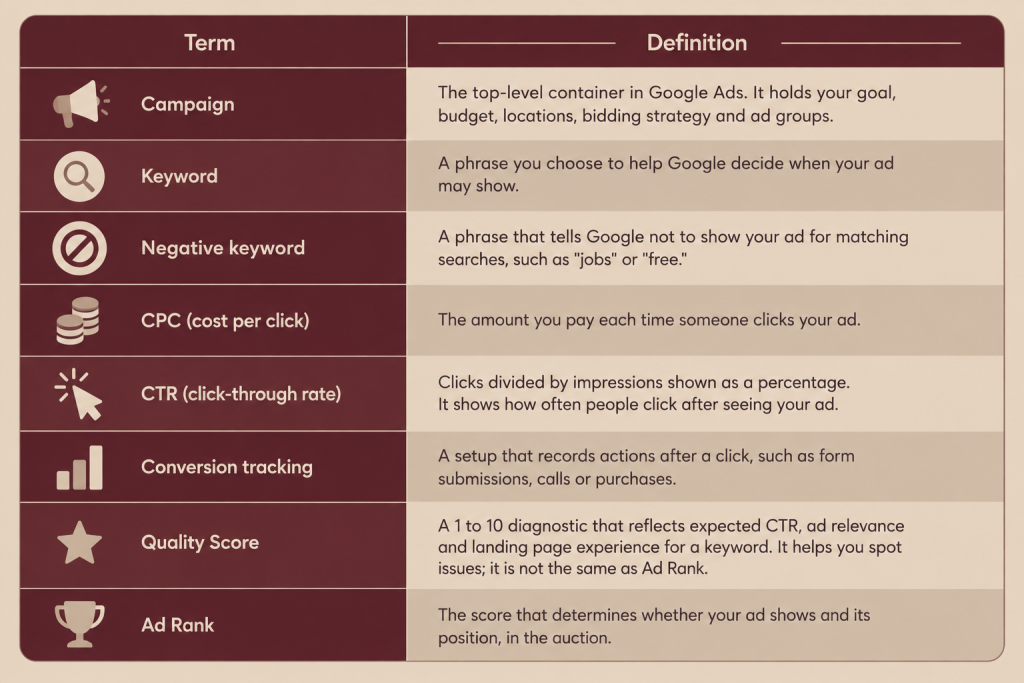
It’s Ad Rank. That’s the number Google uses to decide if your ad appears and where it appears. Google says Ad Rank depends on things. These include your bid, how good your ad and landing page’re the minimum standards that must be met how competitive the auction is, what the search means and how well your ad and its format are expected to work.
In terms:
- Bid: the most you’re ready to pay when someone clicks your ad.
- Ad relevance: how well your ad matches what someone is searching for.
- Expected click-through rate: how likely people are to click your ad.
- Landing page experience: whether your website is helpful on topic and easy to use.
That’s why a small business, with a relevant ad and a strong landing page can actually compete with a much bigger company that spends more. Money counts.. Relevance counts just as much.
What You Need Before Creating Your First Campaign
- Google account: needed to sign in. Use a business email you will keep term.
- Google Ads account: where you build and manage campaigns.
- Website or landing page: ads need a destination. Without one clicks have nowhere useful to go.
- Clear campaign goal: leads, sales, calls or traffic. The goal shapes every setting.
- Target audience: who buys from you what they search and what problem they want solved.
- Target location: the areas you actually serve.
- Keyword ideas: 10 to 20 phrases customers might type.
- Ad copy: headline and description ideas based on your strengths.
- Conversion goal: the action that counts as success (a form fill, a call, a purchase).
- Budget: an amount you can test with based on business economics.
- Payment method: required before ads can run.
- Conversion tracking: set up before or, at launch so you can learn from the click.
How to Create Your First Google Ads Campaign: Step by Step
This walkthrough uses a Search campaign for generation. Menu names may vary slightly as Google updates the interface.
Step 1: Sign in to Google Ads
Go to ads.google.com and sign in with your Google account.
Step 2:. Select your account
New users are guided through account creation and asked for business details. Google often pushes a Smart” or simplified setup; if you want full control look for the option to switch to Expert Mode or skip the guided flow. Always confirm your country, time zone and currency because these cannot be freely changed later.
Step 3: Choose your campaign objective
Click campaign and choose the objective that matches your goal: Leads, Sales or Website traffic. If you are unsure choose the one tied to the action that makes you money.
Step 4: Select the campaign type
Choose Search if you want your text ads to appear when people search on Google. Performance Max appears as an option for Sales, Leads and local store visit objectives so don’t be surprised if you see it suggested.
Step 5: Set up your campaign
Give the campaign an internal name (for example “Dental Leads – Delhi – Search”). Customers never see it. Then review the settings:
- Networks: where the ads can appear. Beginners often keep this focused. Some advertisers turn off the Display Network for Search campaigns to keep control over where ads show.
- Conversion goals: which actions this campaign should optimize for.
- Start and end dates: optional, but useful, for time-limited offers.
Step 6: Choose your target locations
Your target locations determine who can see your ads.
- Country, state or city: Use these when you want to cover areas or serve a broad audience.
- Radius targeting: This works well for businesses like a clinic that wants to reach people within 10 km of its location.
Make sure your location settings match the area where you actually provide services. If you only serve Delhi NCR do not target all of India. Paying for clicks from people outside your service range is one of the ways to waste your advertising budget.
Step 7: Choose your language settings
Language targeting helps Google know which languages your potential customers use in their Google account settings. Pick the language that matches both your ads and your landing page.
If your business serves both Hindi and English speakers you might need ads and landing pages for each language. This ensures your message reaches people in the way.
Step 8: Set your budget
Your daily budget is the average amount you are willing to spend on this campaign every day. According to Google’s help documentation your spending may go above the budget on some days but over the course of a month it should stay close to your daily budget multiplied by the average number of days in a month.
How to think about your budget:
- Start with a test budget. You are not buying sales directly—you are gathering data to learn what works.
- Base your budget on your business economics. Think backwards: How much is a customer worth? How many inquiries turn into customers? What can you afford to pay per inquiry?
- Ensure the budget is high enough to generate data. A budget that gets one or two clicks per day will take too long to give you insights.
- Keep in mind that no budget guarantees leads or sales. Results depend on competition, keyword prices, ad quality, how good your landing page is and the strength of your offer.
Step 9: Choose your bidding strategy
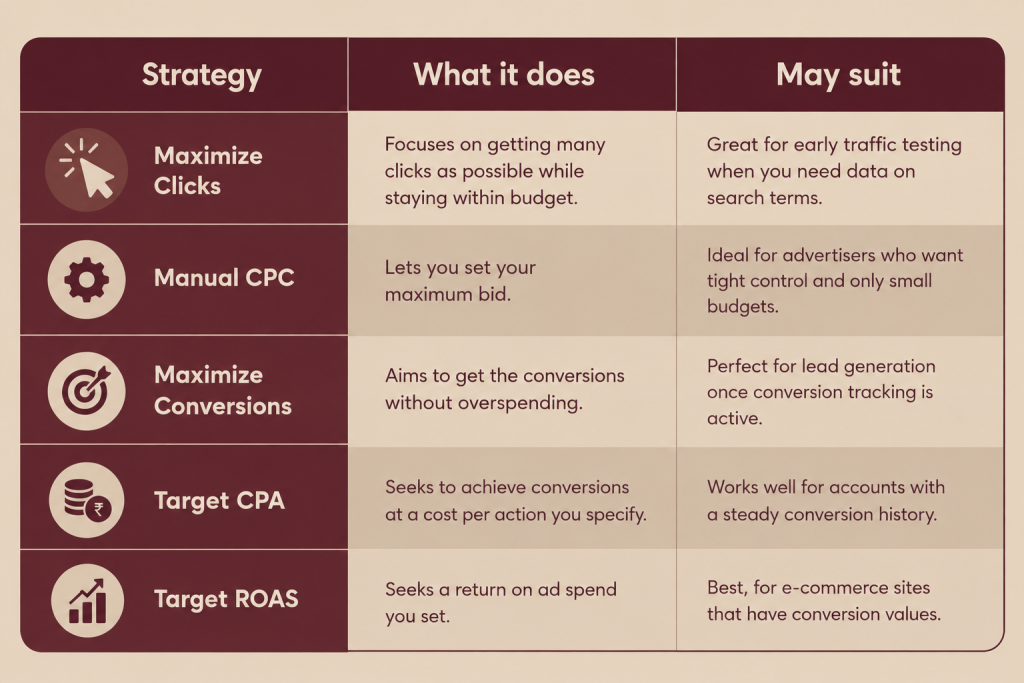
Bidding tells Google how to use your budget during the auction. Google groups strategies that aim for conversions—like Target CPA, Target ROAS, Maximize conversions and Maximize conversion value—as Smart Bidding. These use Google AI to set bids
Google’s documentation also recommends Manual CPC or Maximize clicks if your main goal is getting clicks. For goals related to conversions, such, as sales or leads choose Target CPA, Maximize conversions or Target ROAS.
Step 10: Create your list of keywords
A keyword is a word or phrase that helps Google connect your ad with what people’re looking for. Strong keywords show what people type into the search bar and what your company actually offers.
Consider what people are trying to do when they search:
- Informational: “what is digital marketing” (they want to learn, not make a purchase)
- Commercial: ” digital marketing agency” (they are looking to compare options)
- Transactional: ” marketing agency in Delhi” (they are ready to ask for more information)
Example of how specific a keyword can be:
- General: ” marketing”
- More specific: “digital marketing agency”
- High intent: “digital marketing agency, in Delhi”
Long-tail keywords are longer phrases that are more specific. These usually have search volume but clearer intent. Pick keywords that match what your business actually provides. If your business does not offer something do not try to bid on it.
| Match type | How it behaves | Example keyword | Example searches that may trigger it |
|---|---|---|---|
| Broad match | This type covers the reach; it can appear for searches that are related and for searches that have a similar meaning | digital marketing agency | marketing company for small business |
| Phrase match | This type shows for searches that contain the meaning of the phrase, in a controlled way | "digital marketing agency" | digital marketing agency for startups |
| Exact match | This type is the most controlled; it matches the same meaning or intent exactly | [digital marketing agency] | marketing agency |
| Negative match | Prevents your ads from showing for search queries containing specific terms you want to exclude | -free | free digital marketing agency (Ad will NOT show) |
A broad match can help you reach people but it might also bring in searches that are not relevant. This is especially true if you don’t have data, on what actually converts. That’s why many beginners go with phrase or exact match. It gives them control while they are still learning how their ads perform.
So what is a keyword? A negative keyword is a word or phrase that you tell Google to ignore when showing your ad. If someone searches using that term your ad won’t appear. For a business that sells services adding keywords makes sense. Useful examples could be “jobs,” “salary,” “course,” “” “internship,” or “DIY.” These terms may attract people who aren’t looking to buy. Start by adding these at the beginning and keep updating them as you see the actual search terms coming through. Over time this helps improve your ad performance and saves money on clicks.
Step 12: Create your ad group and campaign structure
An ad group is a set of similar keywords and ads that live inside a campaign. Keep your structure simple:
Campaign: one goal and one specific service area (for example “Dental Leads. Delhi”)
Ad group: one theme (for example “Dental implants”)
Keywords: five to fifteen phrases that are very close in meaning
Ads: one or two ads that are written for that same theme
Avoid setups that are too complex. If your keywords cover services put them in separate ad groups so every ad stays relevant.
Step 13: Write your first Google Search Ad
Search ads these days are Responsive Search Ads. You give headlines and descriptions and Google tests different combinations. Give a variety and make sure the combinations still work.
What to include:
- Keyword relevance: use the phrase naturally in at least one headline.
- Benefits: tell the customer what they will get, not just what you do.
- Differentiation: show what makes you different using real and provable points only.
- Call to action: tell people what to do for example “Get a Free Audit” or “Book a Call”.
Example ( marketing agency):
Headlines:
- Digital Marketing Agency in Delhi
- Get More Qualified Enquiries
- Free Google Ads Account Review
- Clear Reporting. No Lock‑in.
- Talk to a PPC Specialist
Descriptions:
- We plan, launch and optimize Google Ads for businesses. Get a review of your current setup.
- Transparent reporting, focused on enquiries and sales not just clicks. Book your call today.
Only claim things you can deliver. If you say “no lock‑in” or “free review” make sure it is true and can be seen on the landing page.
Step 14: Create or optimize the landing page
The landing page is the page people see after clicking your ad. It strongly affects whether a click becomes an enquiry. Google also checks the landing page experience as part of ad quality.
Checklist:
- Message match: the page should clearly keep the promise that the ad made.
- Clear headline: the visitor should know in a seconds that they are in the right place.
- Relevant content: list your services explain the process give pricing guidance and answer questions.
- Strong CTA: give one next step, such as call, form or book.
- Experience: most local searches happen on phones so test on a phone.
- Loading: slow pages lose visitors.
- Trust signals: show reviews, certifications, real client logos, address and phone number.
- Simple lead form: ask for the information you need.
Avoid sending every click to the homepage. A dedicated page, for each service usually converts better because it matches the visitors intent.
Step 15: Set up conversion tracking
Conversion tracking captures actions people take after they click your ad so you can find out which campaigns and keywords help your business. Just clicks don’t show if the campaign is effective.
Common conversions to track include:
- Form submissions
- Phone calls (from ads or from the website)
- Purchases
- Sign-ups
- Appointment bookings
Setting it up usually requires the Google Ads conversion tag, which is often placed using Google Tag Manager (a tool for managing tracking tags without changing website code every time) or by importing goals from Google Analytics (Googles web analytics platform). Test it by doing the action yourself and checking that it is recorded.
Step 16: Review the campaign
Before you start go through this -launch checklist:
- Goal and campaign type match
- Locations match your actual service area
- Language is correct
- Budget is one that you can afford to test with
- Bidding strategy fits your tracking and data
- Keywords are relevant, with proper match types
- Negative keywords added
- Ads are accurate and follow the rules
- Landing page works on mobile and loads quickly
- Conversion tracking tested
- Payment method added
Step 17: Launch the campaign
Click Publish. New ads are usually checked before they start running which can take a while so don’t worry if you don’t see impressions away. After you launch:
- Check that ads are approved and running.
- Look at the Search terms report to see the queries that trigger your ads.
- Avoid making changes in the first few days. Let the data grow before you make any judgments.
How to Optimize Your First Google Ads Campaign
Optimization means making improvements based on evidence Don’t keep changing settings every hours. Let the campaign gather data first.
Look at the search terms- Find the queries that made your ads show. Add the ones as keywords.
Add keywords- Block searches that don’t matter and aren’t relevant.
Pause keywords- that spend a lot but don’t lead to conversions. These deserve look.
Compare your ads- See which headlines and descriptions get clicks and more conversions.
Check how your landing pages perform- If you get a lot of clicks but few conversions the issue might be the page or the offer.
Review your location data- Spend less where results are weak. Spend more where resultsre strong.
Check devices- Compare how your ads do on mobile and on desktop.
Check your conversion data- Make sure tracking is working correctly before you trust any numbers.
Adjust your budget- Shift money toward what’s working.
Review your bidding- Think about changing strategies after you have conversion data.
Test one thing, at a time- If you change many things at once you won’t know what caused the change.
F.A.Q.
There is no minimum cost you have to stick to. You decide your daily budget and your total cost changes based on how many people click and how much each click costs. Begin with a number that feels right for you to try out.
Yes if you start simple you track conversions. Review data regularly. I feel it becomes risky when you launch without a goal without relevant keywords or, without a proper landing page.
Ads can start showing after approval but meaningful insights usually need weeks of data. Results vary by industry, competition and setup.
For businesses that want to get customers who are already searching a Search campaign is usually the place to begin. The best kind of campaign still depends on what you want to achieve. Online stores might like Shopping or Performance Max better.
Check whether it creates conversions at a price that’s reasonable for the business. Clicks and impressions, by themselves do not show that something is successful.
Futurixmedia
Ready to Launch Your First Google Ads Campaign the Right Way?
Skip the guesswork. Our PPC specialists will review your goals, plan your campaign structure, and show you what to fix before you spend a rupee.
No obligation. Just honest advice for your business.