Google Ads for Small Businesses: Beginner's Guide
A dental clinic has experienced doctors, a set‑up and fair prices. Yet the phone hardly rings, because people searching for “dentist near me” see the competitor’s clinic first. This is where Google Ads, for businesses becomes useful: Google Ads lets you appear in front of people at the moment they are actively looking for what you sell.
Google Ads can also drain a budget quickly if you start without a plan. This guide walks you through the journey: how Google Ads works what Google Ads costs, how to build your first Google Ads campaign, how to track Google Ads results and how to decide whether Google Ads makes sense for your business.
What Is Google Ads?
Google Ads is Googles way of letting businesses show ads through paid advertising. It allows companies to display their ads on Google Search and across Google platforms and partner websites. This happens based on the businesss targeting options, budget and whether they meet the platforms rules.
Most people who are just starting out use PPC, which stands for pay-per-click. With this method you set a budget. Decide which searches your ads should show up for. You usually only pay when someone clicks on your ad not just when it appears.
You can find ads in places. They appear in Google Search results Google Maps, YouTube, Gmail and also on websites and apps that’re part of Google’s partner network. For businesses Google Search is often the most valuable spot. That’s because when someone types a search they are already looking for something
For example imagine someone searches “dentist near me”. A dental clinic that has a Search ad set up might appear at the top of the results marked as “Sponsored”. If the person clicks it they go to the clinic’s website and book an appointment. The clinic pays for that click. The booking counts as a conversion.
Every Google Ads account works, in the basic way. It has a key parts:
- Account: This holds your billing details and overall settings.
- Campaign: This is where you set your budget decide where you want to advertise and choose your advertising goal.
- Ad group: This groups together keywords that are closely related, like ” implants” or “cavity treatment”.
- Ads: These are the headlines and descriptions that people see when they view your ad.
How Does Google Ads Work?
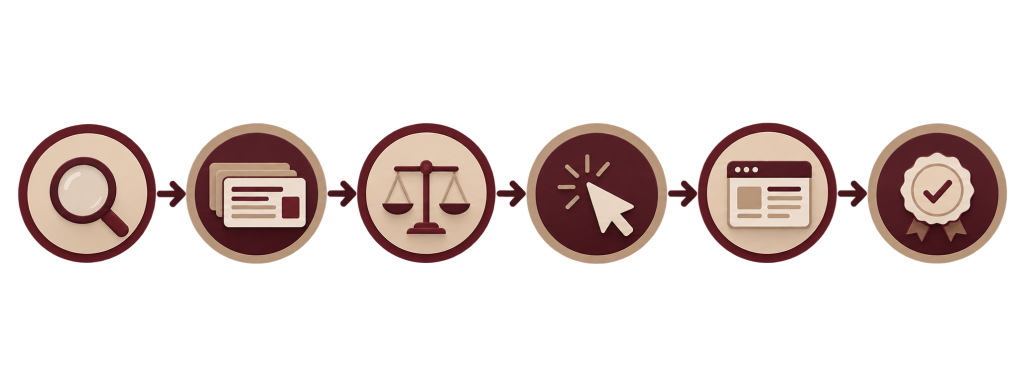
Google Ads operates through an auction that happens every time someone searches on Google. Here’s how it works:
- A user types a search on Google.
- Google looks for ads that match the search using keywords and targeting.
- Eligible advertisers join the auction.
- Google checks each ad that’s eligible.
- Ads are ranked based on Ad Rank.
- The top ads are displayed.
- The user clicks on one.
- The advertiser pays for that click.
- The user goes to the website or landing page.
- A conversion like a call form submission or purchase might follow.
The key point is step 5. The highest bidder doesn’t always win. Ad Rank depends on things:
- Your bid: the highest amount you are willing to pay for a click.
- Ad quality: how likely people are to click, how relevant your ad is and how good your landing page experience is.
- Ad. Formats: the effect of extra features like call buttons, sitelinks or images.
- Context of the search: the device, the location, the time and the actual search query.
That’s why a smaller advertiser with a relevant ad can sometimes beat a larger competitor.. Often they pay less, per click than the maximum bid they set.
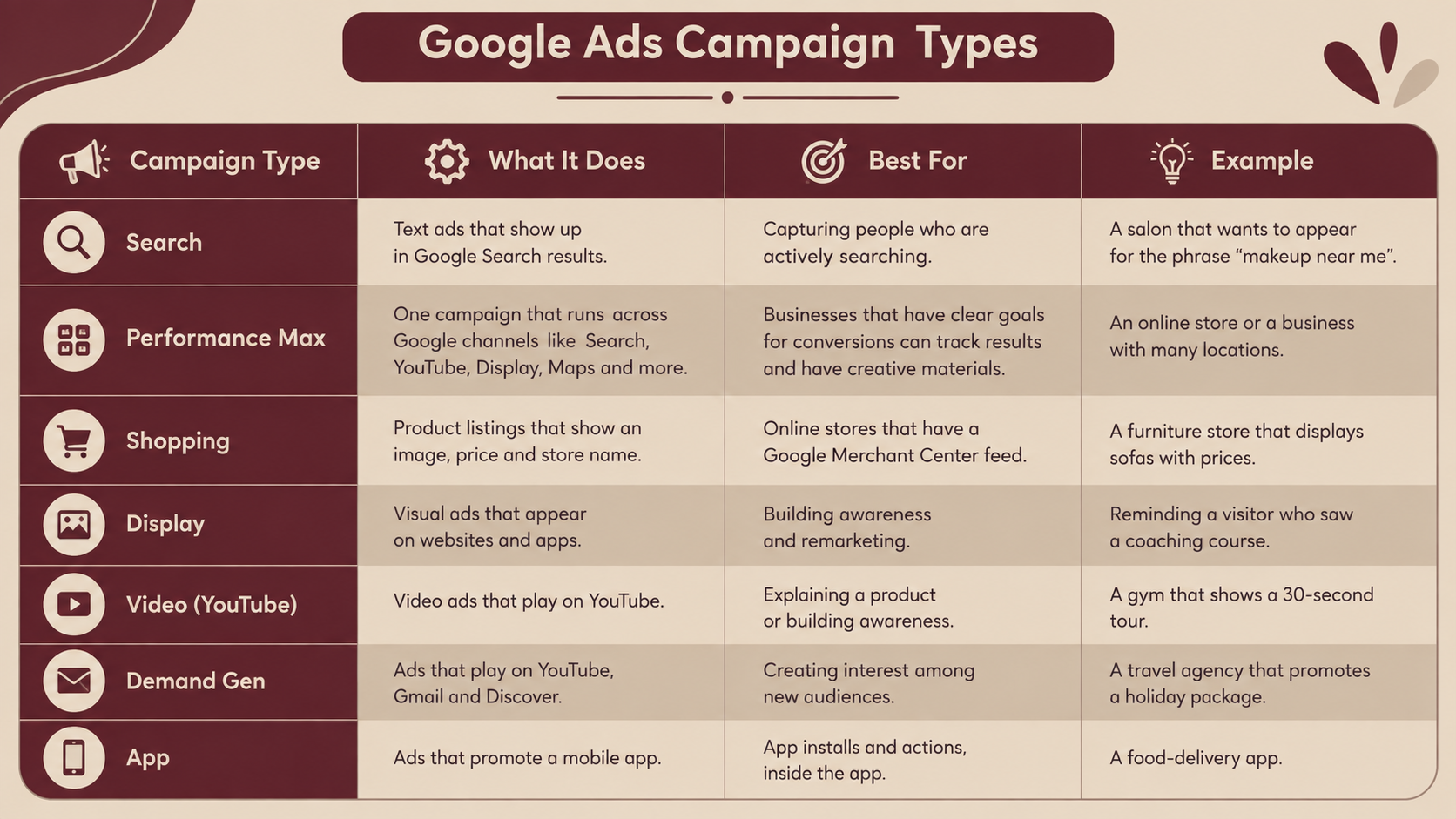
Types of Google Ads Campaigns
Google Ads provides a number of campaign types. The names and choices can change. Check the details, in your Google Ads account or in the official Google Ads Help Center.
Google Search Ads for Beginners
Google Search Ads are text ads that appear when someone searches for a keyword that you have chosen. They work well for businesses because the person is actively looking for something.
A Search ad has these parts:
- Search query: what the person actually types into the search box.
- Keyword: the phrase that you have selected in your account.
- Ad group: a collection of keywords and ads.
- Descriptions: the message that people see.
- Landing page: the page that the person lands on after clicking.
- Call to action: what you want the person to do such as “Call or “Book a slot”.
Realistic example, a local AC repair service:
- Ad group: “AC repair”
- Keywords: “ac repair near me” “ac repair service [city]”
- Headline: “AC Repair in [City] | Day Visit”
- Description: “Certified technicians, transparent pricing, all major brands. Call to book a visit.”
- Landing page: an AC-repair page, with a phone number, a form and service areas.
One tight ad group, one message, one matching page. That match is what makes Search ads work.
Understanding Google Ads Keywords
Keywords are the words and phrases you choose so Google knows when to show your ads. The important skill is understanding search intent—the reason someone is searching for something. It’s not about the words. It’s about what the person wants when they type those words into the search bar. You have to think like a searcher. Why are they looking? What are they hoping to find? Are they ready to buy?. Just looking for information? Getting this right makes all the difference.
Keyword match types
- Broad match: This gives you the reach. Google may show your ad for searches that are related to your keyword, not the exact words. It works best when you have conversion data and you’re closely watching performance.
- Phrase match: Your ad can appear when the search includes the meaning of your keyword with words before or after it.
- Exact match: This is the precise type. It shows your ad only when the search has the meaning as your keyword.
Negative keywords
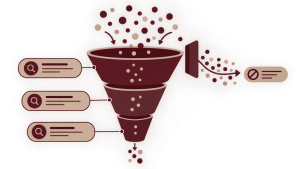
keywords tell Google which searches you don’t want your ad to show for. They are one of the ways to stop wasting money.
- A premium salon might add ” “cheap” “course” and “jobs” as negative keywords.
- A dental clinic offering paid services might use ” dental camp” and “dentist salary”, as negatives.
- A coaching institute might add “PDF” and “free notes” to avoid clicks.
Always check the Search Terms report. It shows the searches people made. That’s where you discover negative keywords.
How to Create Your First Google Ads Campaign
Here is The Small Business Google Ads Framework, followed by the steps:
Goal → Audience → Search Intent → Keywords → Ad → Landing Page → Conversion Tracking → Optimization
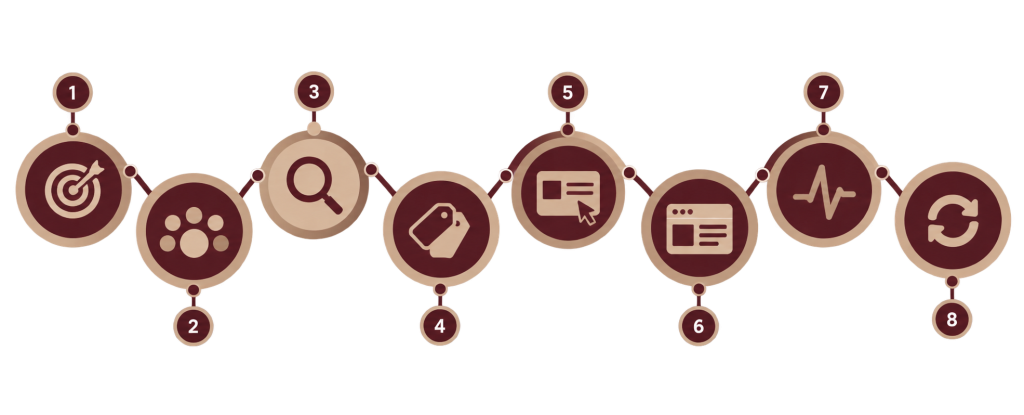
- Define the business goal- Calls form fills, store visits or sales. Pick one goal.
- Identify the audience- Who buys, where they live, what they search.
- Choose the campaign type- Search is the starting point for local services.
- Select geographic targeting- Target the areas you actually serve and review the location option settings.
- Set the budget- Use the calculation above.
- Research keywords- Use Google Keyword Planner and your own customer questions.
- Organize ad groups- One theme per ad group.
- Write ads- Match the search and state the benefit.
- Choose landing pages- One page per service works better, than a homepage.
- Add conversion tracking- Do this before launch.
- Review settings- Check location, language, networks, bidding and schedule.
- Monitor- Watch search terms, conversions and spend.
- Optimize- Add negatives, refine ads improve pages adjust bids.
Landing Pages and Google Ads
Sending every click to your homepage is like taking a customer to the entrance of a shopping mall when they only wanted to visit one store. A dedicated landing page keeps the visitor’s attention focused on what matters.
A strong landing page includes:
- Message match:- the headline should reflect what the ad says and what the person searched for.
- A clear call to action placed above the fold so it’s visible without scrolling.
- Usability:- most people search for local services on their phones so the page must work well on small screens.
- Trust signals:- display reviews, certifications and pricing that’s easy to understand.
- Easy contact options:- a call button, a WhatsApp link and a short form to get in touch.
- A short form:- ask for the information you truly need—no overload.
- Loading:- visitors leave if the page takes more, than a few seconds to open.
- Supporting details:– include a list of services, FAQs and your business address.
The chain to remember is search intent → keyword → ad → landing page. If any part of this chain breaks the chances of conversion drop. Each step must be strong.
Common Google Ads Mistakes Small Businesses Make
Broad keywords- Begin with words that show clear intent.
Ignoring keywords- Check search terms every week in the beginning.
Irrelevant landing pages- Make sure each ad group connects to a page.
No conversion tracking- Set it up before the campaign starts.
Budget without economics- Compare cost per lead with the value of each customer.
Focusing on clicks- Watch for leads and sales too.
Ignoring search intent- Keep “how to” searches from “book now” searches.
Poor geographic targeting- Focus on areas you serve and check location settings.
Changing things often- Let changes have data before making a decision.
Generic ads- Explain what makes you unique and what happens next.
Ignoring users- Test your page. Call button on a phone.
Not reviewing search terms- This report shows where your money is actually going.
Expecting profitability- The first weeks are for learning and improving.
Copying competitors blindly- Their goals, profits and pages are different, from yours.
Stopping campaigns without analysis- Find the problem first: check tracking, targeting, ads or landing page.
F.A.Q.
It can be worth it if the numbers show it makes sense. Worth depends on customer value, profit margin, conversion rate, how strong the competition is and how well the landing page performs. Also tracking has to be accurate. Run a controlled test measure the cost, per lead or sale and see how it compares to what a customer’s actually worth.
Ads can start appearing after they are approved but getting them to perform well takes data and time. Many advertisers spend the few weeks looking at search terms, conversions and how their ads are doing. They use this information to learn before making changes.
Yes that is true, for a simple local campaign that has a small budget and a clear goal. Professional help becomes valuable when you manage campaigns handle complex tracking have a larger budget or when the results are unclear and you lack the time to optimize.
Neither option is better, in every situation. Google Ads gives you speed and control over when your ads show. SEO helps build term organic visibility over time. Many businesses use both strategies. They choose based on their timeline, their budget and how competition they face.
Yes. A small budget works best when you focus on one service, one location and use keywords that match closely with a landing page that is relevant. The challenge is data. With a budget it takes more time to gather enough information to learn what works. It may also be hard to compete for high-traffic keywords because theres money to bid.
WORK WITH FUTURIXMEDIA
Ready to turn more visitors into customers?
Discover opportunities to improve your website experience, strengthen your messaging, and create a clearer path from visitor to customer.
CONTACT US →Digital Marketing & Growth
